Skip to content
Codewyz SupportCodewyz Support
  • Eduwyz
  • -
  • -

Course Management

6
  • Collections
  • Add A Question
  • Add A Quiz
  • Adding A Lesson
  • Editing A Course
  • Adding A Course

Managing Posts

2
  • Editing A Post
  • Adding A Post

Managing Media

2
  • Deleting A Media File
  • Adding Media Files

Managing Pages

1
  • Managing Pages

Managing Comments

1
  • Managing Comments

User Management

3
  • User Profile
  • Editing A User
  • Adding Users
View Categories
  • Home
  • Docs
  • Eduwyz
  • Managing Posts
  • Adding A Post

Adding A Post

< 1 min read

Posts or articles are an integral part of the website as they keep visitors informed and entertained, thus driving more visitors to the site. Additionally they help make the site better searchable via search engines like Google

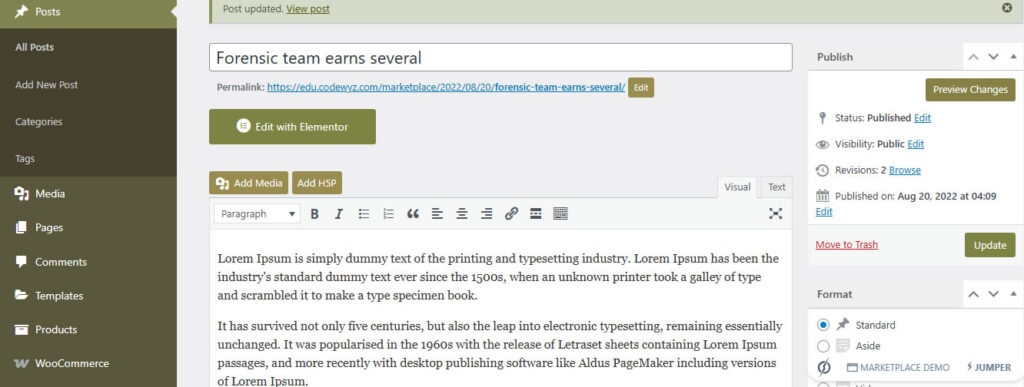
To add a Post, click on Posts menu on the left panel of the website in the Admin Dashboard. Click on Add Post and a screen allowing you to add details of the post will appear. Add the Title of the post and the content, link the post to the appropriate category. Once done publish the post.
Updated on May 2, 2025

What are your Feelings

  • Happy
  • Normal
  • Sad
Share This Article :
  • Facebook
  • X
  • LinkedIn
  • Pinterest

Leave a Reply Cancel reply

Your email address will not be published. Required fields are marked *

Copyright 2025 © Technofarm Online Industries
  • Eduwyz