Skip to content
Codewyz SupportCodewyz Support
  • Eduwyz
  • -
  • -

Course Management

6
  • Collections
  • Add A Question
  • Add A Quiz
  • Adding A Lesson
  • Editing A Course
  • Adding A Course

Managing Posts

2
  • Editing A Post
  • Adding A Post

Managing Media

2
  • Deleting A Media File
  • Adding Media Files

Managing Pages

1
  • Managing Pages

Managing Comments

1
  • Managing Comments

User Management

3
  • User Profile
  • Editing A User
  • Adding Users
View Categories
  • Home
  • Docs
  • Eduwyz
  • Course Management
  • Add A Question

Add A Question

< 1 min read

Click on the LMS link and then Questions. At the top click on the Add A New Question button. Enter the Title and Content of the question

Answer Section #

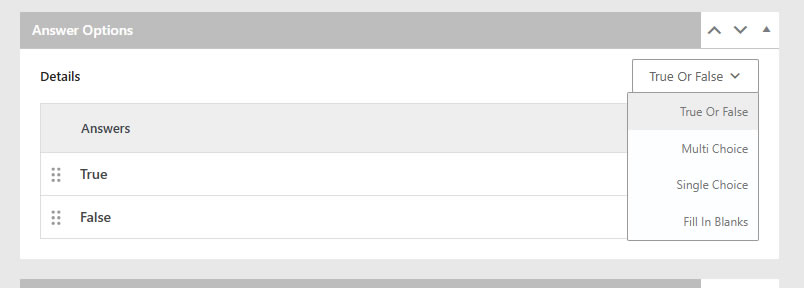
Scroll down to the answer section. Select the the type of answer from the drop down menu as follows

True or False: This allows a person to select either true or false to the question

Multi Choice: This allows a person to select all answers that apply to the question

Single Choice: Allows only one answer to be selected

Fill In The Blank:
Question Settings Section #

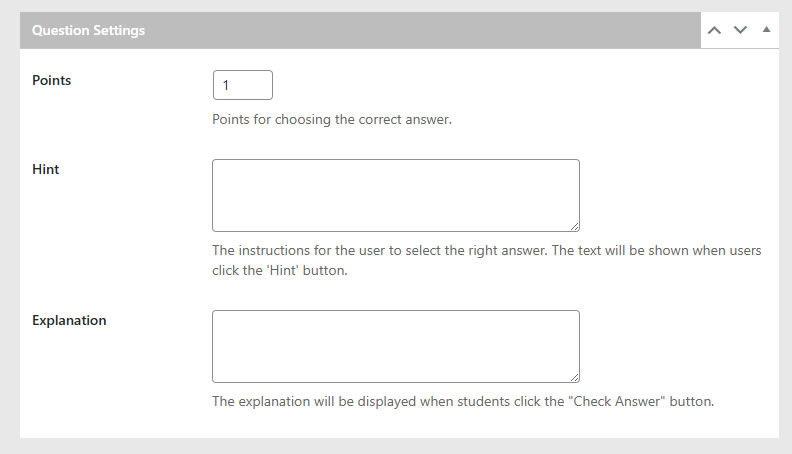
Here you can set Points for the correct answer, Hint, and Explanation
Updated on May 2, 2025

What are your Feelings

  • Happy
  • Normal
  • Sad
Share This Article :
  • Facebook
  • X
  • LinkedIn
  • Pinterest

Leave a Reply Cancel reply

Your email address will not be published. Required fields are marked *

Table of Contents
  • Answer Section
  • Question Settings Section
Copyright 2025 © Technofarm Online Industries
  • Eduwyz